
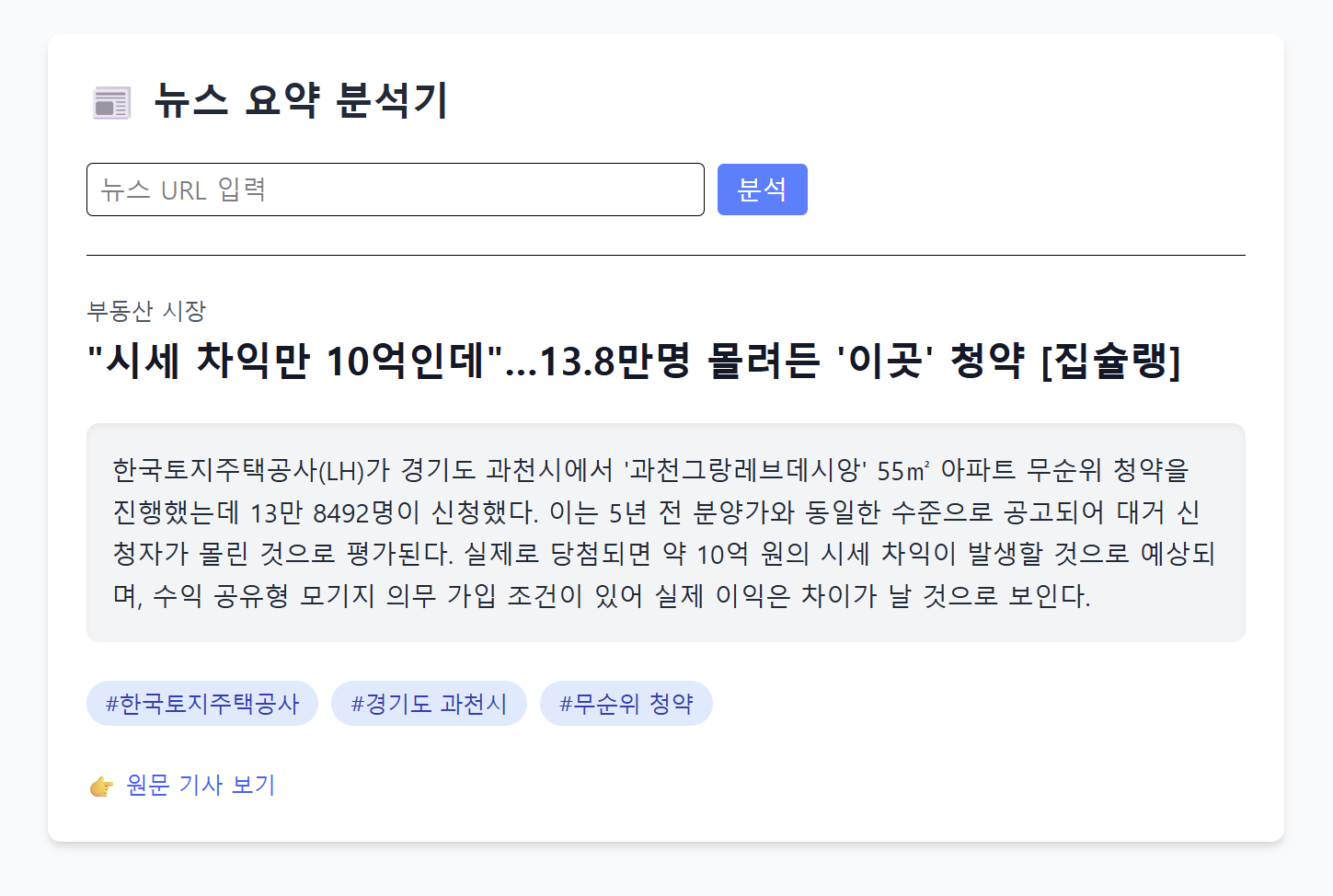
계획
- 사용자가 뉴스 URL을 입력
- 입력된 URL을 백엔드로 POST 요청
- 결과 받아서 요약 결과 보여줌
- 비로그인 상태에서 일 5회 요청 제한
Vite + React 선택
Vite + React는 빠른 개발, 직관적인 설정, 좋은 확장성 때문에
개인 프로젝트나 MVP 개발에 현 시점에서 가장 합리적인 프론트엔드 구조라고 한다.
💡 React 프로젝트에서 MVP라면?
- View: React 컴포넌트
- Model: API, 상태관리
- Presenter: 컴포넌트 외부 로직 (예: useCase, service 함수)
| 역할 | 설명 |
| Model | 데이터와 비즈니스 로직 (API 호출, DB 등) |
| View | UI (사용자에게 보여지는 화면) |
| Presenter | View와 Model을 연결하고 비즈니스 로직을 수행하는 중간 계층 |
MVP는 생소해서 찾아봤는데, Presenter는 View에서 넘어온 데이터를 처리하는 부분이라고 생각하면 될 것 같다.
아무튼, 해당 프로젝트는 간단한 UI이기 때문에 가볍고 빠른 Vite를 사용하기로 했다.
Presenter
const handleSubmit = async (url: string) => {
    const key = getTodayKey();
    const currentCount = parseInt(getCookie(key) || '0');

    if (currentCount >= 5) {
      alert('비회원은 하루 최대 5회까지 분석할 수 있습니다.');
      return;
    }

    setLoading(true);
    setResult(null);

    try {
      const data = await analyzeUrl(url);
      setResult(data);
      setCookie(key, String(currentCount + 1), 1);
    } catch (err) {
      console.error(err);
      alert('분석에 실패했습니다.');
    } finally {
      setLoading(false);
    }
  };
로그인 기능은 없지만 하루 최대 5회 제한을 뒀다. 현재는 Database를 사용하지 않기 때문에 쿠키를 사용했다.
Model
export async function analyzeUrl(newsUrl: string, userId?: string) {
  const res = await fetch(`${API_URL}/api/analyze-url`, {
    method: 'POST',
    headers: {
      'Content-Type': 'application/json',
      // 추후 로그인 토큰 헤더 추가 가능
      // ...(token && { Authorization: `Bearer ${token}` }),
    },
    body: JSON.stringify({url: newsUrl, userId}),
  });

  if (!res.ok) {
    throw new Error('서버 요청 실패');
  }

  return res.json();
}
백엔드에서 만든 API를 호출하는 부분
로그인 기능을 생각하고 userId는 선택적 파라미터로 선언했다.
ESLint: Parsing error: Unexpected token
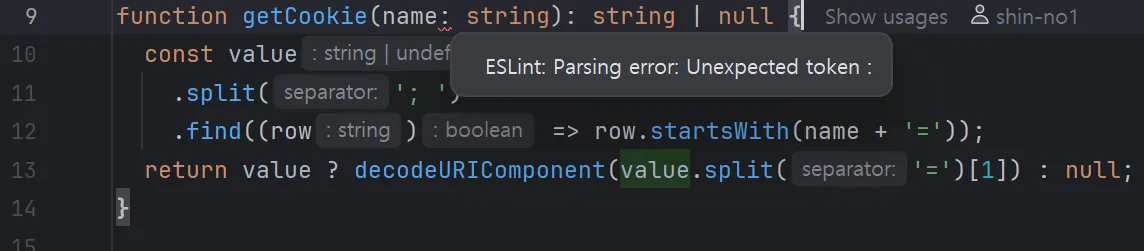
현재 ESLint가 TypeScript 문법(: string, : boolean 등) 을 이해하지 못하고 있기 때문에 발생
// cmd
npm install -D eslint @typescript-eslint/parser @typescript-eslint/eslint-plugin

// eslint.config.ts
import tseslint from 'typescript-eslint';

export default [
  {
    languageOptions: {
      parser: tseslint.parser,
      ...
teslint.parser를 추가해서 해결했다.
해결하지 않아도 정상 실행은 가능하다.
View
return (
    <div className="min-h-screen bg-gray-50 p-8">
      <div className="max-w-3xl mx-auto bg-white shadow-md rounded-lg p-6">
        <h1 className="text-2xl font-bold mb-6 text-gray-800">
          📰 뉴스 요약 분석기
        </h1>

        <UrlForm onSubmit={handleSubmit} />

        {loading && <p className="text-gray-500 mt-4">요약 중입니다...</p>}

        {result && (
          <div className="mt-6 space-y-6 border-t pt-6">
            {/* 주제 */}
            {result.topic && (
              <p className="text-sm text-gray-600 mb-1">
                {result.topic}
              </p>
            )}

            {/* 제목 */}
            {result.title && (
              <h2 className="text-2xl font-bold text-gray-900">
                {result.title}
              </h2>
            )}

            {/* 요약 */}
            {result.summary && (
              <div className="bg-gray-100 p-4 rounded-lg shadow-inner">
                <p className="text-gray-800 whitespace-pre-line leading-relaxed">
                  {result.summary}
                </p>
              </div>
            )}

            {/* 키워드 */}
            {Array.isArray(result.keywords) && result.keywords.length > 0 && (
              <div className="flex flex-wrap gap-2">
                {result.keywords.map((k: string, i: number) => (
                  <span
                    key={i}
                    className="bg-blue-100 text-blue-800 px-3 py-1 rounded-full text-sm font-medium"
                  >
                  #{k}
                </span>
                ))}
              </div>
            )}

            {/* 원문 링크 */}
            {result.url && (
              <div className="mt-2">
                <a
                  href={result.url}
                  target="_blank"
                  rel="noopener noreferrer"
                  className="text-blue-600 hover:underline text-sm"
                >
                  👉 원문 기사 보기
                </a>
              </div>
            )}
          </div>
        )}
      </div>
    </div>
  );
tailwindcss를 사용하였다.
'프로젝트 > 뉴스 요약 (AI)' 카테고리의 다른 글
| [뉴스 요약] REST API 예외 응답 처리 (1) | 2025.06.25 |
|---|---|
| [뉴스 요약] AI 중복 요청 분기 처리 (Database 구성) (0) | 2025.06.23 |
| [뉴스 요약] Swagger, REST Docs 적용 (4) | 2025.06.21 |
| [뉴스 요약] 백엔드 (Jsoup 파싱 + ChatGPT AI 연결) (4) | 2025.06.19 |
| [뉴스 요약] AI API를 이용한 뉴스 요약 프로젝트 기획 (1) | 2025.06.18 |